It turns out that the problem is related to the project “workspace ” file. If you delete em, .. yes you can :-), you get back a more or less speedy XCode.
The Credits for this valuable hint goes to link
have fun
It turns out that the problem is related to the project “workspace ” file. If you delete em, .. yes you can :-), you get back a more or less speedy XCode.
The Credits for this valuable hint goes to link
have fun
SELECT ue.userid, ue.status, ue.timestart, ue.timeend
                      FROM {user_enrolments} ue
                      JOIN {enrol} e ON e.id = ue.enrolid
                     WHERE ue.userid $usql
                           AND e.status = :estatus
                           AND e.courseid = :courseid
                  GROUP BY ue.userid, ue.status, ue.timestart,ue.timeend
and @row 851
SELECT ue.userid, ue.status, ue.timestart, ue.timeend
                  FROM {user_enrolments} ue
                  JOIN {enrol} e ON e.id = ue.enrolid
                 WHERE ue.userid = :uid
                       AND e.status = :estatus
                       AND e.courseid = :courseid
              GROUP BY ue.userid,ue.status, ue.timestart, ue.timeend
have fun
After installing the new Eclipse 3.6M7 Stream Stable Build I could not connect to any update site nor to another project site.
After some investigation I found out that there must be something wrong with the used IP protocol stack. Eclipse seems to use IP4
So if you start eclipse with
./eclipse -vmargs -Djava.net.preferIPv4Stack=true
eclipse should be able to reach your update sites.
A small update to my Post:
I just found out that the real problem is a new sysctl-setting under /etc/sysctl.d/bindv6only.conf. LOL
Check the net.ipv6.bindv6only item this should be 0 (null).
After changing reset the sys kernel variabels with:
sudo invoke-rc.d procps restart
have fun
Just got a new gadget. It’s from TI and called eZ430-Chronos.
The eZ430-Chronos is a highly integrated, wearable wireless development system based for the CC430 in a sports watch. It may be used as a reference platform for watch systems, a personal display for personal area networks or as a wireless sensor node for remote data collection.
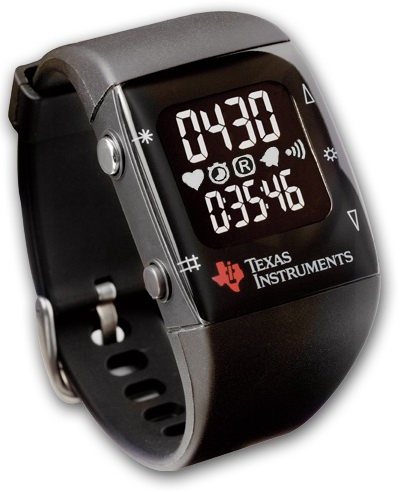
We are planning to use the watch for Sports-Telemetry environments and also for our Ambient Assisted Living Technologies.
Just played around with an extension for the MediaWiki wiki. Collection is the name of the devil :-). Installing was no problem but in the end when I requested the first .pdf I only got back a beautiful shiny white site. Of course some HTML tags were included, but no sign of the expected .pdf file. Hmm,… so I started my investigations.
The server OS is an Ubuntu Karmic with PHP 5.2.x and apache 2.2.x ……..
After an hour I found out that a bug/feature seems to prevent the wm-server to give back the generated lr =>pdf files. The NET suggest,… upgrade to PHP 5.3. So if you have no clue, do what the NET suggests. But Ubuntu Karmic does not have PHP 5.3 as packages available. So, what to do…. I always wanted to do a dist-upgrade on an live system :-).
No sooner said than done! I fired up the upgrade.
 aptitude update
 aptitude install dpkg aptitude get
 aptitude install dpkg aptitude aptaptitude install dpkg aptitude apt
 aptitude safe-upgrade
…did do the trick. And you would not believe it, the MediaWiki extension started to work, and I got a new shiny Ubuntu Lucidy 10.04 LTS.
The story goes on. The main webpage is powerd by a recent version of Typo3 and for some reason some Typo-Code is using functions which are marked as deprecated in PHP5.3. A nice deprecated warning was now replacing our beautiful sites. Our webmaster won’t be amused :-). No big deal you will think, just disable the corresponding error_reporting…
error_reporting = E_ALL & ~E_DEPRECATED
removing E_DEPRECATED did not solve my problem whether changing it in php.ini ,htaccess or in the startup code of Typo. So,… the site is down, and i have no clue what’s going on. Once more, I started up googling. After some time I found some posts concerning about Typo and that ii uses its own error handler, so changing the PHP-INI variables have no effect. lol, okay so where are this variables. As I am not an Typo expert I continued my googling session.
I don’t know why but but it took me “some” time to find this simple configuration flag where you can shut down the internal error handling of Typo.
$TYPO3_CONF_VARS[SYS]['displayErrors'] = 0;
Nice, now our Webmaster will be happy and me too 🙂
This is a patch for getting the WatchPlugin working with trac 0.12.
+++ ./plugin.py    Sat Apr 03 16:56:17 2010
@@ -26,6 +26,7 @@

 from  trac.env         import  IEnvironmentSetupParticipant
 from  trac.util        import  format_datetime, pretty_timedelta
+from trac.util.datefmt import  from_utimestamp, to_utimestamp
 from  trac.web.chrome  import  INavigationContributor
 from  trac.web.api     import  IRequestFilter, IRequestHandler, RequestDone
 from  trac.web.chrome  import  ITemplateProvider, add_ctxtnav, add_link, add_script, add_notice
@@ -38,6 +39,7 @@
 from  trac.wiki.model  import  WikiPage
 from  trac.ticket.model import Ticket

+
 __DB_VERSION__ = 3

 class WatchlistError(TracError):
@@ -347,9 +349,9 @@
 'name' : name,
 'author' : author,
 'version' : version,
-                        'datetime' : format_datetime( time ),
-                        'timedelta' : pretty_timedelta( time ),
-                        'timeline_link' : timeline_link( time ),
+                        'datetime' : from_utimestamp( time ),
+                        'timedelta' : pretty_timedelta( from_utimestamp(time) ),
+                        'timeline_link' : timeline_link( from_utimestamp(time) ),
 'comment' : comment,
 'notify'  : notify,
 })
@@ -426,9 +428,9 @@
 'author' : author,
 'commentnum': to_unicode(self.commentnum),
 'comment' : len(self.comment) <= 250 and self.comment or self.comment[:250] + '...',
-                        'datetime' : format_datetime( changetime ),
-                        'timedelta' : pretty_timedelta( changetime ),
-                        'timeline_link' : timeline_link( changetime ),
+                        'datetime' : from_utimestamp( changetime ),
+                        'timedelta' : pretty_timedelta( from_utimestamp( changetime ) ),
+                        'timeline_link' : timeline_link( from_utimestamp( changetime ) ),
 'changes' : changes,
 'summary' : summary,
 'notify'  : notify,
This patch applies to rev 7710, you can download the patch from trac-Hacks
Have fun 🙂
After upgrading one of my servers i got “insserv: There is a loop between service umountnfs and open-vm-tools if stopped” . A quick look in to the run script turns out that their is a dependency -> “# Required-Start: $local_fs $remote_fs”.
Removing the “$remote_fs” fixed the dependency loop for me:
The corresponding section in the “open-vm-tools” script looks like:
### BEGIN INIT INFO
# Provides: open-vm-tools
# Required-Start: $local_fs
# Required-Stop: $local_fs
# X-Start-Before: $network
# X-Stop-After: $network
# Default-Start: 2 3 4 5
# Default-Stop: 0 1 6
# Description: Runs the open-vm-tools services
# Short-Description: Runs the open-vm-tools services
### END INIT INFO
I’m using a Debian testing Distribution with Open-VM-Tools (2010.03.20-243334-4)
In the next few weeks, months, years i will blog about stuff concerning my day to day business – also known as work – my hobbies, and interesting themes which come along.